Why Nepalese Businesses Should Switch to Microsoft 365 Today

In today’s fast-paced digital world, Nepalese businesses need tools that boost productivity, enhance collaboration, and ensure security. As a trusted Microsoft Partner in Nepal, Webtech Nepal is proud to offer Microsoft 365, a powerful suite of cloud-based tools designed to help businesses thrive. Whether you’re a small startup in Kathmandu or a growing enterprise in Pokhara, switching to Microsoft 365 can transform the way you work. Here’s why Nepalese businesses should make the switch today.

Boost Productivity with Familiar Tools

Microsoft 365 combines apps that Nepalese businesses already know and love, including Word, Excel, PowerPoint, and Outlook. These tools are now cloud-powered, meaning you can access them from anywhere, whether you’re at your office in Lalitpur or traveling to Biratnagar. With real-time collaboration, your team can edit documents together, saving time and reducing errors. For example, a marketing team in Bhaktapur can work on a presentation with colleagues in Butwal, all in one file, without emailing versions back and forth.

Webtech Nepal helps businesses set up these tools seamlessly, ensuring your team can focus on work, not technical hiccups. Additionally, Microsoft 365’s AI-powered features, such as writing suggestions in Word or data insights in Excel, make tasks faster and more efficient.

Work Together, Anywhere, Anytime

Nepal’s business landscape is diverse, with teams often spread across cities or working remotely. Microsoft 365’s cloud-based platform, including Microsoft Teams, makes collaboration effortless. Teams lets you chat, hold video meetings, and share files in one place. Imagine a construction firm in Chitwan coordinating with suppliers in Dhangadhi through video calls and shared project plans—all without leaving the app.

As your Microsoft Partner, Webtech Nepal ensures your team is trained to use Teams and other tools effectively. Whether it’s a retailer in Nepalgunj or a tourism agency in Pokhara, we help you stay connected and productive, regardless of your employees’ location.

Keep Your Business Secure

Cybersecurity is a growing concern for Nepalese businesses, particularly with the increasing number of online transactions. Microsoft 365 offers world-class security features to protect your data. Tools like Microsoft Defender safeguard your devices and emails from threats, while OneDrive ensures your files are backed up and secure in the cloud. For instance, a financial consultancy in Kathmandu can store sensitive client data safely, knowing it’s protected against ransomware or accidental deletion.

Webtech Nepal customizes Microsoft 365’s security settings to meet your business needs, providing you with peace of mind. We also offer ongoing support to keep your systems safe as cyber threats evolve.

Save Costs and Scale Easily

For many Nepalese businesses, managing IT costs is a priority. Microsoft 365’s subscription model means you only pay for what you need, with plans that suit businesses of all sizes. Instead of buying expensive software licenses or maintaining servers, you get access to the latest tools with automatic updates. A small café in Thamel can start with a basic plan, while a manufacturing company in Hetauda can opt for advanced features, such as Power BI, for data analytics.

Webtech Nepal helps you choose the right plan and scale your business as it grows. We ensure you get the most value from your investment, avoiding unnecessary expenses.

Stay Ahead with AI and Innovation

Microsoft 365 isn’t just about today—it’s about preparing your business for the future. With tools like Microsoft Copilot, you can automate tasks, summarize emails, or create professional presentations in seconds. For example, a school in Birgunj can utilize Copilot to draft reports, while a logistics firm in Itahari can analyze delivery data more efficiently. These AI features enable Nepalese businesses to stay competitive in the global market.

As Nepal’s Microsoft Reseller Partner, Webtech Nepal keeps you updated on the latest Microsoft 365 innovations. We provide training and support to ensure your team makes the most of these cutting-edge tools.

Why Choose Webtech Nepal?

Switching to Microsoft 365 is more than just adopting new software—it’s about transforming how your business operates. At Webtech Nepal, we understand the unique needs of Nepalese companies. As a Microsoft Partner, we offer:

  • Local Expertise: Our team in Nepal understands the unique challenges local businesses face, including connectivity issues and budget constraints.
  • Tailored Solutions: We customize Microsoft 365 in Nepal to fit your industry, whether it’s hospitality, education, or retail.
  • Training and Support: We offer comprehensive hands-on training and 24/7 support to ensure a seamless transition and ongoing success.

Make the Switch Today

Nepalese businesses are embracing digital transformation, and Microsoft 365 is the perfect tool to stay ahead. From boosting productivity to enhancing security, it’s a game-changer for companies across Nepal. Let Webtech Nepal guide you through the process, so you can focus on growing your business.

Ready to transform your workplace? Contact Webtech Nepal today to learn how Microsoft 365 can empower your business. Let’s build a more productive, secure, and innovative future together!

Microsoft 365 Free Nonprofit Licenses Are Ending in 2025

For many nonprofit organizations worldwide, Microsoft 365 has been a vital tool. Thanks to Microsoft’s generous donation program, nonprofits can use Microsoft 365 Business Premium and Office 365 E1 plans at no cost. These tools include familiar apps like Word, Excel, Outlook email, Teams for meetings, and OneDrive for file storage — all of which help nonprofits run smoothly without incurring extra costs.

But there’s an important update: Microsoft will stop offering these free Microsoft 365 licenses to nonprofits starting July 1, 2025. This change will impact thousands of nonprofits that have relied on free access to these powerful tools.

What Exactly Is Changing?

Until now, nonprofits could apply and receive free licenses for Microsoft 365 Business Premium or Office 365 E1. These licenses provided full access to Microsoft’s apps and services at no cost — a significant benefit for organizations with limited budgets.

After July 1, 2025, Microsoft will no longer give out these free licenses.

  • If your nonprofit currently uses these free licenses, you can keep using them until your license renewal date after July 1, 2025.
  • For example, if your renewal date is October 2025, you can continue using your free license until then; however, after that, your free access will expire.

Why Is Microsoft Ending the Free Licenses?

Microsoft hasn’t given many public reasons, but this move is likely to help ensure sustainable support and continued improvements in their products. Free services can be challenging to maintain in the long term, and shifting nonprofits to paid or discounted plans enables Microsoft to invest more in security, updates, and support.

What Are Your Options Moving Forward?

Don’t worry — Microsoft has made alternative options to help nonprofits continue using Microsoft 365:

1. Microsoft 365 Business Basic — Free for Up to 300 Users

  • This plan provides access to web and mobile versions of Microsoft Office applications, including Word, Excel, and PowerPoint (although not the complete desktop applications).
  • You also get a business email (Outlook), OneDrive cloud storage, Teams for communication, and SharePoint for file sharing.
  • It’s entirely free for nonprofits and works great if you mainly use apps online or on phones/tablets.

2. Discounted Paid Plans

  • If your organization needs the full desktop Office apps (the programs you install on your computer), you can purchase Microsoft 365 Business Premium or Office 365 E1 licenses.
  • Microsoft offers these at up to 75% off the regular price for eligible nonprofits, making it much more affordable than standard business pricing.

3. Enterprise Agreements for Large Organizations

  • Nonprofits with more than 300 users can qualify for larger volume licenses (up to 2,000 seats) through Microsoft’s Enterprise Agreements.
  • These agreements offer more customization and advanced support options for bigger organizations.

What Should Nonprofits Do Now to Prepare?

This change is expected to arrive in about two years, but the time to act is now. Here’s a simple action plan:

Step 1: Find Out Your Renewal Date

  • Check when your current free Microsoft 365 license is set to expire.
  • This will inform you of the duration for which you can continue using the free service.

Step 2: Evaluate Your Needs

  • Do you need full desktop Office apps, or is web/mobile access enough?
  • How many users will need access?
  • What features are critical for your organization (email, file storage, collaboration)?

Step 3: Choose Your Next Plan

  • If you can work with web/mobile apps, the free Business Basic plan is a great choice.
  • If you need full desktop apps or advanced features, consider the discounted paid plans.

Step 4: Backup Your Important Data

  • Before any changes or migrations, back up all your emails, files, and documents.
  • This protects you against data loss during the transition.

Step 5: Plan Your Transition

  • Decide well before your renewal date.
  • Coordinate with your IT team or service provider to ensure a smooth setup of the new plan.

Why Taking Action Early Matters

Transitioning your organization’s email, files, and collaboration tools can be a complex process. Planning will reduce the risk of service interruptions and give your team time to get comfortable with any new tools.

Microsoft Partner and nonprofit support partners, such as TechSoup, are providing resources to help with this change. Utilize their guides and support services to make the transition as smooth as possible.

Final Thoughts

While losing the free Microsoft 365 Business Premium and Office 365 E1 grants may feel like a setback, it’s also an opportunity to upgrade and future-proof your nonprofit’s digital tools.

With Microsoft’s discounted plans and free Business Basic tier, nonprofits can continue accessing powerful, reliable productivity tools without breaking the bank.

Stay informed, plan early, and your organization will continue thriving with Microsoft 365.

References and Resources

Why Upgrade to Microsoft 365 A5 for Education?

Microsoft 365 A5 for Education is the most advanced tier of Microsoft’s productivity and security suite, tailored specifically for schools, colleges, and universities. It combines premium Office apps, enterprise-grade security, advanced analytics, and cutting-edge collaboration tools—all designed to empower educators, students, and IT administrators.

Educational institutions face unique challenges in delivering secure, efficient, and engaging learning environments. Microsoft 365 A5 offers a comprehensive solution tailored for education, combining advanced security, analytics, and productivity tools to empower schools, colleges, and universities. Upgrading to Microsoft 365 A5 offers significant benefits over lower-tier plans, such as A1 or A3, making it an ideal choice for institutions seeking to enhance teaching, learning, and operational efficiency.

Key Benefits of Microsoft 365 A5

1. Enhanced Security and Compliance

Cybersecurity is a top priority for educational institutions handling sensitive student and staff data. Microsoft 365 A5 includes advanced security features to protect against threats and ensure compliance:

  • Microsoft Defender for Endpoint: Proactively detects and responds to advanced cyber threats, safeguarding devices across your network.
  • Azure Active Directory Premium P2: Offers identity protection with risk-based conditional access and privileged identity management, reducing unauthorized access risks.
  • Microsoft Purview: Offers data loss prevention, eDiscovery, and compliance tools to meet regulations such as GDPR and FERPA, ensuring data privacy and legal compliance.

These tools help schools protect sensitive information, reduce the risk of data breaches, and maintain trust with students, parents, and regulators.

2. Advanced Analytics for Better Decision-Making

Microsoft 365 A5 includes powerful analytics to support data-driven decisions:

  • Education Insights Premium: Tracks student engagement, attendance, and performance trends, enabling educators to identify at-risk students and tailor interventions.
  • Power BI Pro: Delivers customizable dashboards and reports, helping administrators analyze operational data, such as resource allocation or program effectiveness.
  • Microsoft Viva Insights: Provides staff with personalized productivity insights, fostering better work habits and reducing burnout.

These analytics tools empower institutions to optimize teaching strategies, improve student outcomes, and streamline administrative processes.

3. Enhanced Collaboration and Productivity

Microsoft 365 A5 builds on the productivity tools in A1 and A3, offering advanced features to support hybrid and remote learning:

  • Microsoft Teams Premium Features: Includes live captions, meeting recordings, and breakout rooms, enhancing virtual classroom engagement.
  • Desktop and Mobile Apps: Provides complete access to Word, Excel, PowerPoint, and OneNote, enabling seamless content creation and collaboration across all devices.
  • Cloud-Based Management: Simplifies device and app management with Microsoft Intune, ensuring secure access across student and staff devices.

These tools create a flexible, inclusive learning environment that supports both in-person and remote education.

4. Advanced Communication Tools

Effective communication is critical for educational institutions. Microsoft 365 A5 includes:

  • Microsoft Teams Phone: Enables voice calling and PBX functionality, streamlining communication for staff and faculty.
  • Audio Conferencing: Supports large-scale meetings and parent-teacher conferences with dial-in capabilities.
  • Enterprise-Grade Email: Offers a 100 GB mailbox per user, along with advanced security and compliance features.

These features ensure reliable, secure communication across your institution, enhancing collaboration and engagement.

5. Cost-Effective Scalability

While Microsoft 365 A5 has a higher upfront cost than A1 or A3, it offers long-term savings by reducing the need for third-party security, analytics, or communication tools. Its scalability makes it suitable for institutions of all sizes, from small schools to large universities, allowing you to add users and features as needed without requiring an overhaul of your IT infrastructure.

Who Should Upgrade to Microsoft 365 A5?

Microsoft 365 A5 is ideal for:

  • Large Institutions: Universities or school districts needing advanced security and analytics for large user bases.
  • Security-Conscious Schools: Institutions prioritizing data protection and compliance with strict regulations.
  • Hybrid Learning Environments: Schools requiring robust tools for both in-person and remote education.
  • Data-Driven Organizations: Institutions seeking to leverage analytics to improve student outcomes and operational efficiency.

Smaller schools with basic needs may find Microsoft 365 A3 sufficient, but A5 is the best choice for those requiring comprehensive features and future-proofing.

How to Upgrade

Upgrading to Microsoft 365 A5 is straightforward with the proper support:

  • Assess Your Needs: Evaluate your institution’s security, analytics, and collaboration requirements to confirm A5 is the right fit.
  • Check Eligibility: Verify that your institution meets Microsoft’s eligibility criteria for accreditation as an educational organization.
  • Consult a Microsoft Partner: Work with a trusted Microsoft Partner like Webtech Nepal to plan and execute a seamless upgrade, minimizing disruptions.

Train Your Staff: Leverage Microsoft’s training resources or partner-led workshops to ensure staff and educators maximize A5’s features.

Why Act Now?

With increasing cyber threats, evolving compliance requirements, and the growing demand for hybrid learning, upgrading to Microsoft 365 A5 positions your institution for success. Early adoption allows you to:

  • Stay ahead of cybersecurity risks with advanced protection.
  • Improve student and staff experiences with cutting-edge tools.
  • Streamline IT management and reduce long-term costs.

Get Started with Webtech Nepal

As a Microsoft Partner, Webtech Nepal specializes in helping educational institutions transition to Microsoft 365 A5. Our team can assess your needs, provide tailored licensing options, and support a smooth implementation. Contact us today to explore how Microsoft 365 A5 can transform your institution’s digital ecosystem.

For more information, please visit Microsoft’s Education Hub or contact our team for a personalized consultation. Empower your school with the tools to thrive in a modern educational landscape.

Microsoft 365 Business Premium and Office 365 E1 Grants to Be Discontinued

Microsoft has announced significant changes to its nonprofit grant programs, affecting charities and nonprofit organizations worldwide. As of July 1, 2025, the free Microsoft 365 Business Premium and Office 365 E1 grants will be discontinued. This change will impact organizations relying on these donated licenses for their operations, requiring proactive planning to ensure a smooth transition.

What’s Changing?

The Microsoft 365 Business Premium grant, which currently provides up to 10 free licenses, and the Office 365 E1 grant, offering cloud-based productivity tools, will end at each nonprofit’s next renewal date after July 1, 2025. After this date, organizations will need to transition to alternative licensing options to continue using these services.

Microsoft’s Tech for Social Impact team is streamlining its grant portfolio to focus on a unified offering, with an emphasis on the Microsoft 365 Business Basic plan. This shift aims to simplify licensing options while continuing to support nonprofit missions with accessible technology.

What Are the Alternatives?

Nonprofits have several options to maintain access to Microsoft 365 tools:

  1. Microsoft 365 Business Basic Grant: Microsoft will continue to offer up to 300 free Microsoft 365 Business Basic licenses for eligible nonprofits. This plan includes web and mobile versions of Word, Excel, PowerPoint, Microsoft Teams, SharePoint, and OneDrive, with 1 TB of storage per user and a 50 GB mailbox. However, it does not include desktop versions of Office apps or advanced security features available in Business Premium.
  2. Discounted Licenses: Nonprofits can access up to 75% discounts on paid versions of Microsoft 365 Business Premium and Office 365 E1. For example, Microsoft 365 Business Premium is available at approximately $5.50 per user per month for nonprofits, providing access to desktop apps, AI tools, advanced security, and device management.
  3. Enterprise Agreement for Large Nonprofits: Organizations with 300 or more employees can access up to 2,000 Office 365 E1 licenses through an Enterprise Agreement, offering a cost-effective solution for larger charities.

Why This Matters

This change will have a significant operational and financial impact, particularly for small to mid-sized charities that rely on the full-featured desktop apps and advanced security tools provided by Microsoft 365 Business Premium and Office 365 E1. The transition to paid licenses, even at a discounted rate, may strain budgets for organizations operating on tight margins. Additionally, downgrading to the Business Basic plan means losing access to certain features, such as desktop applications and advanced cybersecurity tools, which could affect productivity and security.

The transition period may also pose challenges, especially for charities with renewals shortly after July 1, 2025. Limited planning time could lead to service disruptions or data access issues if licenses are not updated promptly. Smaller charities may face a greater risk of digital inequality, as they often struggle to absorb the costs associated with digital initiatives compared to larger organizations.

How to Prepare

To minimize disruptions, nonprofits should take the following steps:

  1. Review Your Current Plan: Check if your organization is using grant-based versions of Microsoft 365 Business Premium or Office 365 E1. Log into the Microsoft 365 Admin Center to confirm your licensing details and renewal date.
  2. Assess Your Needs: Evaluate your organization’s reliance on desktop apps, advanced security, or other features exclusive to Business Premium or E1. Determine whether the Business Basic plan meets your needs or if a paid plan with a discount is a more suitable option.
  3. Plan the Transition: Use tools like the Scheduled Order Manager in the Microsoft 365 Admin Center or consult with a Microsoft partner to align the transition with your renewal date. Act before the 30-day grace period post-renewal to avoid license deactivation, noting that data deletion may occur 60 days after deactivation if no action is taken.
  4. Budget for Changes: Factor in the cost of discounted licenses (e.g., approximately $5.50 per user per month for Business Premium) when planning your budget. Explore funding options or reallocate resources to accommodate the new costs.
  5. Seek Expert Guidance: Partner with a Microsoft-certified IT provider, such as Webtech Nepal, to assess your needs, explore licensing options, and ensure a seamless transition. Microsoft also offers resources, such as FAQs and support, through its nonprofit community.

Our Recommendations

  • Act Early: Start planning now to avoid last-minute disruptions. Review your renewal date and begin exploring licensing options well in advance.
  • Consider Business Basic for Cost Savings: If your organization can operate with web and mobile apps, the free Business Basic grant (up to 300 users) is a cost-effective solution.
  • Leverage Discounts for Advanced Features: For charities needing desktop apps or enhanced security, the discounted Business Premium plan offers a robust set of tools at a reduced cost.
    Spread the Word: Inform other charities or nonprofit partners about these changes to help them prepare.

Need Help?

Navigating these changes can be complex, but you don’t have to do it alone. As a trusted Microsoft partner, Webtech Nepal specializes in providing tailored IT solutions to support charities. Contact us to schedule a planning session and ensure your organization remains productive, secure, and compliant.

For additional information, refer to Microsoft’s official FAQ on the discontinuation of the Business Premium and Office 365 E1 grant. Stay ahead of these changes to keep your charity’s operations running smoothly and continue focusing on your mission.

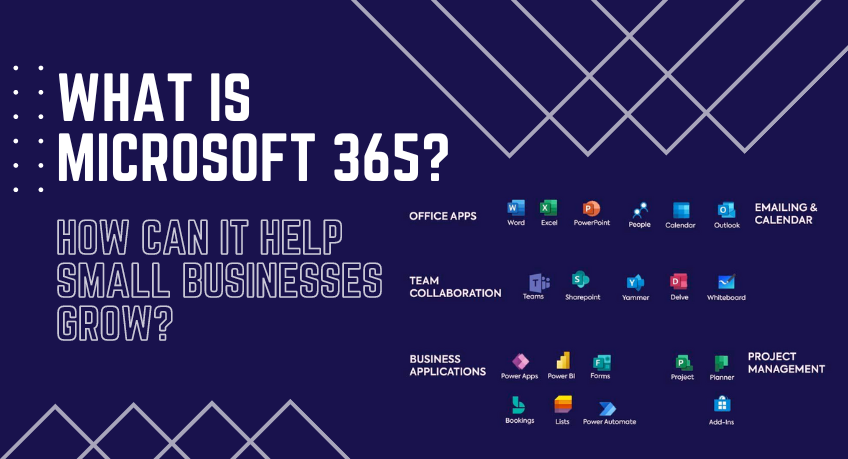
What is Microsoft 365, and how can it help small businesses grow?

Microsoft 365, formerly known as Office 365, is a robust suite of productivity and collaboration tools designed to enhance business operations. From its inception as a simple set of office applications, Microsoft 365 has evolved into a comprehensive business solution. It offers a vast range of features that can help businesses of all sizes to grow. Its powerful tools, coupled with its versatility and scalability, can make a significant difference in how a business operates, especially in today’s digital and interconnected world.

Features and services of Microsoft 365?

Microsoft 365 offers various services designed to increase productivity and collaboration within businesses. The Office Suite includes familiar applications like Word, Excel, and PowerPoint. Once confined to desktop installations, these applications are now enhanced with cloud capabilities, allowing seamless collaboration and access from any internet-enabled device.

In addition to the Office Suite, Microsoft 365 streamlines email and calendaring with Outlook and Exchange. These tools go beyond simple messaging and scheduling, providing businesses with powerful organization and communication capabilities crucial in today’s fast-paced business environment.

For collaboration, Microsoft 365 offers tools like Teams and SharePoint. Teams is a hub for teamwork where you can chat, hold meetings, and share files and apps. On the other hand, SharePoint is a secure place to store, organize, share, and access information from any device.

Furthermore, Microsoft 365 includes business management tools like Bookings, simplifying scheduling and managing appointments, and Invoicing, which makes creating professional invoices easy. These are just the tip of the iceberg, as Microsoft 365 includes many other tools to help businesses manage their operations effectively.

How Microsoft 365 Helps Small Businesses Grow

Microsoft 365 can be a game-changer for small businesses. It enhances collaboration and communication through Teams and SharePoint, allowing seamless remote interaction. This can be particularly beneficial in the current climate, where remote work is becoming more prevalent.

Another significant benefit of Microsoft 365 for small businesses is its potential to improve productivity. The Office Suite’s cloud capabilities allow for real-time editing and sharing of documents, reducing time spent on back-and-forths and streamlining teamwork.

Microsoft 365 also ensures data security and compliance, a crucial aspect for businesses dealing with sensitive information. It provides built-in security measures and compliance tools, giving businesses peace of mind knowing their data is protected.

Lastly, the scalability and flexibility of Microsoft 365 make it a perfect fit for growing businesses. As a business expands, its software requirements can change. Microsoft 365’s scalable nature allows businesses to adjust their software usage based on their current needs.

The Benefits of Microsoft 365 for Small Businesses

Microsoft 365, formerly Office 365, is a comprehensive suite of productivity tools designed to boost business efficiency and collaboration. It offers many features that can aid businesses of all sizes, but small businesses, in particular, can reap significant benefits. From enhancing collaboration to improving productivity, ensuring data security, and providing scalability, Microsoft 365 is a game-changer for small business operations.

Enhancing Collaboration and Communication

One of the main advantages of Microsoft 365 for small businesses is its ability to enhance collaboration and communication. Tools such as Teams and SharePoint facilitate seamless interaction, even from remote locations. Teams serve as a hub for teamwork, allowing businesses to chat, hold meetings, and share files and apps. At the same time, SharePoint provides a secure platform for storing, organizing, sharing, and accessing information. This level of connectivity can help small businesses to operate more efficiently, regardless of their team’s geographical locations.

Improving Productivity

Microsoft 365 can significantly improve productivity within small businesses. Its Office Suite, which includes applications like Word, Excel, and PowerPoint, now comes with cloud capabilities, allowing for real-time editing and sharing of documents. This functionality reduces time spent on back-and-forths and streamlines teamwork. Furthermore, tools like Outlook and Exchange provide powerful organization and communication capabilities, beyond simple messaging and scheduling, that are crucial in today’s fast-paced business environment.

Ensuring Data Security and Compliance

Data security is vital for all businesses, and Microsoft 365 provides robust security measures and compliance tools. Small businesses dealing with sensitive information can have peace of mind knowing that their data is protected. Microsoft 365 includes built-in security features that safeguard business data and help maintain compliance with industry regulations, a critical aspect for small businesses aiming to establish trust with their clients and partners.

Differences plans of Microsoft 365 for Small Business

Microsoft 365 is a comprehensive suite of productivity tools designed to enhance business operations. It offers a variety of plans tailored to meet the needs of businesses of all sizes, including small businesses. Choosing the right strategy is crucial as it can significantly impact your business’s efficiency and growth. This post will explore the differences between the different Microsoft 365 small business plans.

Microsoft 365 Business Basic

The Microsoft 365 Business Basic plan is designed for businesses that require basic office applications and some cloud services. It includes web and mobile versions of Word, Excel, and PowerPoint, along with services like Microsoft Teams, cloud storage, and sharing through OneDrive. It also includes email and calendaring through Outlook and Exchange. This plan is ideal for businesses that need basic productivity tools and are just beginning to explore cloud-based services.

Microsoft 365 Business Standard

The Microsoft 365 Business Standard plan offers a more extensive range of features. It includes everything in the Business Basic plan, desktop versions of Office applications, and additional services like Publisher and Access. It also has more advanced tools for business management, like Bookings and Invoicing. This plan is well suited for businesses that need a broader range of productivity and management tools and prefer having the flexibility to use desktop applications and cloud services.

Microsoft 365 Business Premium

The Microsoft 365 Business Premium plan is the most comprehensive for small businesses. It includes everything in the Business Standard plan, plus advanced cybersecurity features like Advanced Threat Protection and Device Management. It also provides compliance solutions like Information Protection and Governance and Identity and Access Management. This plan is perfect for businesses that handle sensitive information and require top-tier security and compliance solutions and a full range of productivity tools.

Difference Between Microsoft 365 and Office 2021

Microsoft offers a range of productivity tools to cater to different user needs and preferences. Two of the most popular ones are Microsoft 365 and Office 2021. While they might seem similar because they provide access to well-known applications like Word, Excel, and PowerPoint, they differ in many ways. This blog post will delve into the differences between Microsoft 365 and Office 2021, providing insights to help users make an informed choice.

The choice between Microsoft 365 and Office 2021 depends on individual or business needs. If you need the latest features, regular updates, and access to cloud-based services for collaboration, Microsoft 365 is likely the better choice. However, if you need the core Office applications and prefer a one-time purchase without a recurring fee, Office 2021 may be more suitable. Understanding these differences can help you make the right choice for your productivity needs.

Microsoft 365: A Subscription-Based Service

Microsoft 365, formerly Office 365, is a subscription-based service that provides access to the latest versions of Microsoft Office applications, including Word, Excel, and PowerPoint. It also includes other productivity services enabled over the internet (cloud services).

Microsoft 365 offers several advantages:

  1. The subscription model ensures users can access the latest features, updates, and security improvements without upgrading their software suite.
  2. It includes cloud-based services like OneDrive, Microsoft Teams, and Exchange, which are unavailable with Office 2021. These tools facilitate collaboration, file sharing, and remote work.
  3. Microsoft 365 subscriptions come with different packages, so users can choose a plan that best fits their needs.

Office 2021: A One-Time Purchase

Office 2021, on the other hand, is a standalone product that users can purchase with a one-time fee. It provides access to the same core Office applications as Microsoft 365 but does not include all the bells and whistles of the subscription-based model.

Office 2021 is a good choice for users who want to avoid paying a recurring fee and don’t require the additional features offered by Microsoft 365. Once purchased, it’s yours to use indefinitely. However, it’s important to note that Office 2021 receives different frequent feature updates than Microsoft 365. Users will have access to security updates, but they won’t get new features that are added after the release of Office 2021.

Conclusion

In conclusion, Microsoft 365 is more than just a set of office applications. It’s a comprehensive business solution that can help small businesses grow by enhancing collaboration, improving productivity, ensuring data security and compliance, and providing scalability. The success stories of small businesses that have integrated Microsoft 365 into their operations are a testament to its value. By choosing Microsoft 365, businesses invest in tools and a foundation for growth, efficiency, and success.

Microsoft Windows Server 2022 Buyer’s Guide

Are you planning to upgrade your organization’s server infrastructure? Look no further than Microsoft Windows Server 2022, the latest edition of Microsoft’s renowned server operating system. With powerful features, enhanced security, and improved performance, Windows Server 2022 is a game-changer for businesses of all sizes.

In this Microsoft Windows Server 2022 Buyer’s Guide, we will walk you through the key aspects and benefits of Windows Server 2022, helping you make an informed decision for your organization’s server needs.

1. Enhanced Security:
Keeping your data and systems secure is paramount, with cyber threats constantly evolving. Windows Server 2022 brings advanced security features like a secured-core server, secure DNS, and improved encryption capabilities. These additions provide a robust defense against malware, unauthorized access, and data breaches, ensuring the protection of your critical business information.

2. Improved Performance:
Windows Server 2022 is designed to optimize performance and ensure seamless operations. The operating system leverages innovations such as Storage Migration Service, delivering enhanced speed and efficiency in storage management. Additionally, in-memory database caching and Azure Arc integration improve performance and scalability, making it an ideal choice for businesses with growing workloads.

3. Hybrid Cloud Capabilities:
Windows Server 2022 seamlessly integrates with Azure, Microsoft’s cloud computing platform. This integration enables businesses to leverage the power of the hybrid cloud, allowing for the migration of workloads between on-premises servers and the cloud. Empower your organization with the flexibility to scale resources as needed and take advantage of innovative cloud services while retaining control over your infrastructure.

4. Simplified Management:
Efficient server management is crucial for maintaining productivity and minimizing downtime. Windows Server 2022 introduces new management tools and features such as Windows Admin Center and Windows Server Core edition. These tools offer a simplified and intuitive server management interface, enabling administrators to perform tasks quickly and effectively.

5. Application Compatibility:
Windows Server 2022 ensures seamless application compatibility, enabling businesses to run their existing applications without hiccups. This allows for a smooth transition and minimizes disruptions during the upgrading process. Additionally, the operating system supports containerization, facilitating the modernization of applications and leveraging the scalability and agility of containerized deployments.

Microsoft Windows Server 2022 is a robust and secure solution for organizations seeking to enhance their server infrastructure. With its advanced security features, improved performance, seamless cloud integration, simplified management tools, and application compatibility, Windows Server 2022 offers a comprehensive package for businesses of all sizes.

When considering an upgrade, trust in the capabilities of Windows Server 2022 to streamline operations, boost productivity, and safeguard your data. Make the smart choice for your organization’s future growth by choosing Microsoft Windows Server 2022 as your preferred server operating system.

Microsoft Windows Server 2022: Must Know

Microsoft Windows Server 2022 is the latest version of the Windows Server operating system, released by Microsoft in October 2021. It is designed specifically for a server operating system and offers various features and improvements compared to its predecessors.

Some key highlights of Windows Server 2022 include:

1. Hybrid capabilities: Windows Server 2022 helps facilitate hybrid cloud deployments by offering seamless integration with Microsoft Azure services. It enables organizations to extend their on-premises infrastructure to the cloud and leverage Azure services for scalability, security, and management.

2. Security enhancements: There are several security enhancements in Windows Server 2022 to strengthen the overall security posture. These include secure default settings, support for Secure Core servers, Windows Defender Antivirus and Windows Defender Firewall improvements, strengthened authentication mechanisms, and enhanced threat detection and response capabilities.

3. Storage improvements: Windows Server 2022 introduces Storage Migration Service (SMS), which simplifies the process of migrating servers and their data to newer hardware or the cloud. It also includes improvements to Storage Spaces Direct (S2D) and File Server Resource Manager (FSRM), providing better scalability and performance.

4. Hyper-V enhancements: Hyper-V, the virtualization platform in Windows Server, sees various improvements in the 2022 version. It introduces features like GPU pass-through for virtual machines, resizable BAR support, support for VM quick creation, and VM fleet management, allowing organizations to manage their virtualized infrastructure efficiently.

5. Application compatibility: Windows Server 2022 focuses on improving application compatibility and ease of migration. It offers compatibility for legacy applications and provides tools like Azure Migrate and App Compatibility FOD (Feature on Demand) to streamline the application migration process.

6. Windows Admin Center: Windows Server 2022 works seamlessly with Windows Admin Center, a web-based management tool with a centralized interface for managing servers, clusters, and hyper-converged infrastructure. It offers a comprehensive set of GUI-based server management, monitoring, and troubleshooting tools.

Windows Server 2022 is available in different editions, including Standard, Datacenter, and Essentials, each with specific features and licensing options to cater to various business needs.

Windows Server 2022 delivers an updated and feature-rich server operating system that aims to address the evolving needs of modern data centers, hybrid cloud environments, and virtualization technologies.

What is Windows Server 2022?

Windows Server 2022 is the latest version of Microsoft’s server operating system. It is designed to provide a reliable, secure, and scalable platform for various server applications and services. It includes many new features and improvements over its predecessor, Windows Server 2019.

Some key features of Windows Server 2022 include enhanced security, improved performance, increased scalability, and new management capabilities. It introduces advanced multilayer security measures to protect against evolving threats and provides features like a secured core server and secured virtualization to safeguard critical workloads.

Windows Server 2022 also brings improvements in terms of performance and scalability. It includes optimizations for modern hardware architectures to deliver faster and more efficient performance. It supports higher VM density, enhanced storage performance, and improved networking capabilities.

Windows Server 2022 introduces new management tools and features to simplify server administration. It includes an improved Windows Admin Center, which offers a modern web-based interface for managing servers, clusters, and hybrid environments. It also provides enhanced hybrid capabilities to integrate with Azure services and enables seamless management and migration of workloads between on-premises and cloud environments.

Overall, Windows Server 2022 is a robust server operating system that offers enhanced security, performance, scalability, and management capabilities for organizations of all sizes.

Different Versions of the Microsoft Server 2022

Microsoft has yet to officially release or announce any specific versions of Windows Server 2022. However, it is worth noting that Microsoft typically offers various editions of their server operating systems, each tailored to different usage scenarios and customer needs.

1. Standard Edition:

Designed for small to medium-sized businesses, it includes general-purpose server functionality with features like Active Directory, file and print services, and remote access.

Windows Server 2022 Standard is designed to provide a robust and reliable platform for running enterprise-level applications and services. It offers a range of features and improvements, including enhanced security, increased performance, and improved scalability.

2. Datacenter Edition:

Geared towards large organizations and enterprises, it provides advanced virtualization capabilities, including unlimited Hyper-V and Windows Server containers.

Windows Server 2022 Data Center is the latest version of Microsoft’s server operating system. It is designed to provide a scalable and reliable platform for running enterprise-level applications and services. Windows Server 2022 Data Center offers various features and capabilities to support various data center needs, including virtualization, storage management, network services, security, and administration.

3. Essentials Edition:

Targeted at small businesses with up to 25 users, it offers simplified management tools, integration with cloud services, and Windows Server roles and features.

4. Web Edition:

Focused on hosting websites and web applications, it provides a more cost-effective option for web hosting providers.

Please note that this information is based on previous versions of Windows Server, and Microsoft may release official details on specific editions for Windows Server 2022 in the future. Keep an eye on Microsoft’s official website and announcements for the most up-to-date information.

Windows Server 2022 Licensing Overview

Pricing and licensing overview
Windows Server 2022 Edition Ideal for Licensing model CAL requirements Suggested Retail Price (MSRP)
Datacenter Highly virtualized datacenters and cloud environments Core-based Windows Server CAL $6,155
Standard Physical or minimally virtualized environments Core-based Windows Server CAL $1069
Essentials Small businesses with up to 25 users and 50 devices Specialty servers (server license) No CAL required $501

[1] CALs are required for every user or device accessing a server. See the Product Use Rights for details.

[2] Datacenter and Standard edition pricing is for 16 core licenses.

[3] Up to 10 cores and 1 VM on single-socket servers. Windows Server Essentials is available through our OEM Server Hardware partners.

[4] Pricing is shown in USD and may vary from country to country.


Windows Server 2022 Licensing: In Details

Windows Server 202 is a server operating system designed and developed by Microsoft. It is the successor to Windows Server 2019 and is part of the Windows NT family of operating systems.

Licensing for Windows Server 202 is done through the Windows Server 202 Licensing model, which includes several editions, each with its own features and licensing requirements. Here are the details of the Windows Server 202 licensing:

1. Editions: Windows Server 202 comes in several editions, including:
– Datacenter Edition: This edition is designed for highly virtualized data centers and offers unlimited virtualization rights along with advanced features such as software-defined networking and storage.
– Standard Edition: This is suitable for non-virtualized or lightly virtualized environments. It provides limited virtualization rights and fewer advanced features than Datacenter Edition.
– Essentials Edition: This edition is tailored for small businesses with up to 25 users and 50 devices. It offers a simplified server management experience and supports basic server functions.

2. Licensing Model: Windows Server 202 uses a Core-based licensing model, which means the licenses are based on the number of processor cores in the server. You need to buy the appropriate number of Core licenses to cover all the physical cores in the server.

3. Core Licenses: Each physical processor in the server requires a minimum of 8 Core licenses, and there is a minimum purchase requirement of 16 Core licenses per server. Additional Core licenses can be purchased in increments of 2 cores. For example, if you have a server with two physical processors, each with 8 cores, you would need a minimum of 16 Core licenses (8 cores per processor) to license the server.

4. CAL (Client Access License) Requirements: Besides the Core licenses, you may need to purchase CALs to access Windows Server 202 based on your edition. CALs are required for each user or device that directly or indirectly accesses the server’s features or data. Datacenter Edition does not need CALs, while Standard and Essentials Editions have CAL requirements.

5. Licensing Scenarios: Windows Server 202 offers various licensing scenarios and options, such as:

– Physical Servers: You can license each physical server according to the number of cores as mentioned earlier.
– Virtual Servers: If you have a highly virtualized environment, you can license all the physical cores in the server (minimum of 16 Core licenses) and get unlimited virtualization rights for both Datacenter and Standard Editions.
– Containers and Hyper-V: Windows Server 202 allows you to use the same licensing model for containers and Hyper-V instances, i.e., you need to license all the cores of the host server running the containers or virtual machines.

It’s important to note that the details provided here are a general overview of Windows Server 202 licensing. It’s recommended to consult Microsoft’s official licensing documentation or contact a licensing specialist to get accurate and up-to-date information based on your specific needs and requirements.

Upgrading to New Windows Server 2022

Upgrading to Windows Server 2022 from an older version involves a few steps to ensure a smooth transition. Here’s a general guide to help you with the process:

1. Compatibility Check: Start by checking the compatibility of your existing hardware and software with Windows Server 2022. Review the system requirements and verify that your server meets them. Additionally, check the compatibility of any third-party applications or services critical to your environment.

2. Backup: Before proceeding with any major upgrade, creating a complete backup of your existing server is crucial. This will be a safety net if anything goes wrong during the upgrade process.

3. Evaluate Licensing: Ensure that your licensing is valid and covers the upgrade to Windows Server 2022. If necessary, acquire any additional licenses required for the new version.

4. Prepare the Migration Plan: Develop a detailed migration plan that includes the order in which you will migrate your servers, how you’ll handle data migration, and any potential downtime or disruptions. Identify any dependencies between servers to ensure a smooth transition.

5. Perform a Test Migration: It is advisable to perform a test migration in a non-production environment to simulate the process and uncover any potential issues. This will help you refine your migration plan and mitigate any risks.

6. Install Windows Server 2022: Once you’re confident in your migration plan, install Windows Server 2022. This can be done by performing an in-place upgrade on the existing server or setting up a new server and migrating your data and services.

7. Migrate Data and Services: If you’re performing a fresh installation, transfer your data and services from the older server to the new one using your created migration plan. Ensure that all necessary configurations, permissions, and settings are properly migrated.

8. Test and Validate: After the migration, thoroughly test the functionality of your systems, applications, and services running on Windows Server 2022. Validate that everything works as expected and that any dependencies have been correctly addressed.

9. Decommission the Old Server: Once you’re confident that the migration was successful and all systems are running smoothly on Windows Server 2022, decommission the old server and remove it from your infrastructure.

10. Post-Migration Tasks: Perform any necessary post-migration tasks, such as updating documentation, verifying backups, adjusting security settings, and monitoring the performance of your new server environment.

Remember, each organization’s setup and requirements may differ, so it’s essential to tailor the migration process to your needs. It is also recommended to consult official documentation and seek assistance from Microsoft support or qualified professionals to ensure a successful upgrade. Contact Webtech Nepal, authorized Microsoft Reseller Partner to buy Windows Server,
 

Benefits of Buying Microsoft Products in Nepal

Benefits of Buying Microsoft Products in Nepal with Microsoft Partner Nepal

is not just a matter of convenience but also of guaranteeing safety and quality. Opting for a reputable reseller lowers the risks of purchasing counterfeit or unauthorized products, preventing potential legal, security, and compatibility issues. Webtech Nepal will explore the advantages of buying from a trusted Microsoft reseller partner, highlighting product warranties, reliable technical support, professional advice, and the assurance of adhering to licensing compliance.

Purchasing Microsoft products from Webtech Nepal ensures genuine products, competitive pricing, technical expertise, license management, value-added services, and the convenience of a local presence. It provides peace of mind and a reliable source for all your Microsoft software needs.

Buying from a trusted Microsoft reseller partner in Nepal comes with several benefits. Here are some of them:

1. Authenticity and Genuine Products: Webtech Nepal, a trusted Microsoft reseller partner, ensures you receive genuine and authorized Microsoft products. They source their products directly from Microsoft, guaranteeing authenticity and eliminating concerns about counterfeit or pirated software.

2. Product Selection: Webtech Nepal, a Microsoft reseller partner, offers a wide range of products from Microsoft, including operating systems, office productivity suites, server software, cloud-based solutions, and more. Webtech can help you choose the right products based on your specific requirements and provide customized solutions.

3. Competitive Pricing: Webtech Nepal often offers competitive pricing for Microsoft products, as we have established partnerships with Microsoft. We can provide cost-effective solutions tailored to your budget, saving you money compared to purchasing directly from Microsoft.

4. Technical Expertise and Support: We are trained and knowledgeable about Microsoft products. Webtech Nepal can offer technical assistance, answer your queries, and guide you through purchasing. Additionally, we can provide after-sales support, troubleshooting, and any necessary product updates or upgrades.

5. License Management: Webtech Nepal can help manage your software licenses effectively. We can advise on the appropriate licensing programs for your organization or business. We can assist with license renewals, migrations, and compliance, ensuring you stay within the legal framework and avoid potential licensing issues.

6. Value-Added Services: Webtech Nepal offers value-added services, such as implementation support, training, and consulting. We can help you with the installation and configuration of Microsoft software, ensuring smooth deployment and optimal utilization of the products.

7. Local Presence: Choosing a trusted Microsoft reseller partner in Nepal ensures you have a local point of contact. This can be advantageous regarding communication, service delivery, and addressing regional requirements or challenges.

8. Enhanced Security: Trusted Microsoft resellers understand the importance of security, especially in today’s digital landscape. Webtech Nepal can guide the implementation of security measures and ensure your Microsoft software is up-to-date with the latest security patches and updates. This helps protect your systems and data from potential cyber threats.

9. Tailored Solutions: Webtech Nepal has in-depth knowledge of Microsoft’s product portfolio and can recommend solutions tailored to your needs. Whether you are an individual, small business, or enterprise, We can identify the most suitable Microsoft products and licensing options that align with your requirements and objectives.

10. Simplified Procurement: Partnering with a reseller simplifies the procurement process. We have established relationships with Microsoft and can streamline the ordering, delivery, and invoicing processes, making purchasing Microsoft products more efficient and hassle-free.

11. Access to Promotions and Special Offers: Reseller partners often have access to promotions, discounts, and special offers provided by Microsoft. They can inform you about these opportunities and help you take advantage of cost-saving initiatives, allowing you to maximize the value of your investment.

12. Knowledge Transfer and Training: Webtech Nepal can provide training and knowledge transfer sessions to assist you and your team effectively use Microsoft products. We can offer workshops, seminars, or online resources to enhance your understanding and utilization of the software, improving productivity and efficiency.

13. Strategic Partner for Business Growth: Webtech Nepal can be a valuable strategic partner for your business growth. We can advise you on leveraging Microsoft technology to optimize operations, enhance collaboration, and drive innovation. Our insights and expertise can contribute to your long-term success and digital transformation journey.

14. Strong Relationship with Microsoft: Established reseller partners developing solid relationships with Microsoft. This lets them stay updated on the latest product advancements, roadmap, and developments. By aligning with a trusted reseller partner, you can gain insights into upcoming releases, feature updates, and new solutions, keeping you ahead of the curve in technology adoption.

In conclusion, buying from a trusted Microsoft reseller partner in Nepal provides various benefits, including enhanced security, tailored solutions, simplified procurement, promotion access, knowledge transfer, and guidance for business growth. It’s a reliable and convenient way to acquire Microsoft products and leverage their full potential.

Buy Microsoft 365 Plans from the Trusted Microsoft Reseller Partner in Nepal

Microsoft 365 is a powerful solution that empowers organizations to enhance productivity, promote collaboration, and embrace the benefits of the cloud. While purchasing Microsoft 365 plans in Nepal, partnering with a trusted Microsoft Reseller is essential. Webtech Nepal is a Trusted Microsoft Reseller Partner in Nepal that brings expertise, competitive pricing, and dedicated customer support and ensures the authenticity of your licenses. Choose Webtech Nepal, a trustworthy , to provide a smooth purchasing experience and ongoing support for your Microsoft 365 journey.

In today’s technology-driven world, businesses of all sizes rely heavily on efficient communication, collaboration, and productivity tools. Microsoft 365 has emerged as a leading solution that combines the power of familiar Microsoft Office applications with cloud-based services, enabling users to work effectively from anywhere in the world. Suppose you are based in Nepal and looking to purchase Microsoft 365 plans. In that case, seeking a trusted Microsoft Reseller Partner is essential to ensure a seamless purchasing experience and reliable customer support.

Why Choose Microsoft 365 Business?

Microsoft 365 offers a comprehensive suite of cloud-based applications and services that cater to the diverse needs of both individuals and businesses. With Microsoft 365 Business Plan, users can access familiar tools like Word, Excel, PowerPoint, and Outlook, along with a host of other collaboration and communication tools such as Teams and OneDrive.

Here are some key reasons why Microsoft 365 is a preferred choice for organizations:

1. Productivity and Collaboration: Microsoft 365 provides tools that enhance productivity and enable seamless collaboration among team members. It offers real-time co-authoring, file sharing, and integration across various services, enabling teams to work together efficiently.

2. Cloud-Based Accessibility: With Microsoft 365’s cloud-based approach, users can access their files and applications from any device with an internet connection. This flexibility allows users to work remotely, whether traveling or working from home.

3. Enhanced Security: Microsoft takes security seriously and integrates advanced security features into the Microsoft 365 suite. These measures include data encryption, multi-factor authentication, and built-in compliance capabilities, which help protect sensitive information and ensure regulatory compliance.

Choosing a Trusted Microsoft Reseller Partner in Nepal:

When it comes to purchasing Microsoft 365, it is crucial to choose a reliable Microsoft Reseller Partner in Nepal. Here’s why:

1. Expert Knowledge: Trusted Microsoft Reseller Partners possess in-depth knowledge and expertise about Microsoft products and licensing. They can guide you in selecting the most suitable Microsoft 365 plan based on your requirements.

2. Competitive Pricing: Authorized Microsoft Resellers offer competitive pricing, ensuring you get the best value for your investment. They can provide subscription-based pricing options, allowing you to choose the most cost-effective plan for your organization.

3. Dedicated Customer Support: Working with a reputable Microsoft Reseller Partner ensures access to dedicated customer support. They understand the complexities of Microsoft licensing and can assist with any licensing or technical issues, providing prompt resolutions.

4. Genuine Licensing: Purchasing through trusted Microsoft Reseller Partners ensures you receive genuine Microsoft licenses. This helps protect your organization from the risks of counterfeit or unauthorized software.